

Integration guide
1. Explore & deploy Omnivaults from Kiln Dashboard
Public omnivaults are visible in the Explore catalog in Kiln Dashboard. You can also select an asset manager to craft bespoke Omnivaults.
Explore catalog of omnivaults from Kiln
1️⃣ Once connected to Kiln Dashboard, navigate to the Explore section.
2️⃣ Analyze & compare strategies - assets, yields, TVL growth…
Deploy & manage omnivaults
3️⃣ Deploy your Omnivault to start distribution—it will be added to your organization at this stage
4️⃣ Manage your Omnivaults from the Manage section—view Omnivaults; change their name, status, fees, etc
2. Get your API credentials
- Log into your Kiln dashboard (testnet org)
- Generate your API token→ See API Keys Guide
3. Omnivaults reporting via API
Now that you've deployed omnivaults in your organization and have your API credentials, this section covers how to query omnivault information for display in your frontend or monitoring dashboards.
3.1 List Omnivaults and fetch their information (APY, assets, protocols)
API - GET
/omnivaults
Retrieve all omnivaults contracts deployed for your organization and their associatated information (APY, deposit assets, icons, protocols)
curl --location 'https://api.testnet.kiln.fi/omnivaults' \
--header 'Authorization: Bearer kiln_testnet-api-key'Route:
/omnivaults?chain_ids=&status=&asset_manager=&omnivault_ids=Query-params:
chain_ids: parameter to specify the chains you want to query onasset_ids: parameter to specify the assets you want to query onstatus:filter by deployment statusesasset_manager: true/false - Filter by whether the omnivault points to a multivehicleomnivault_ids: parameter to specify the omnivaults you want to query on
Returned information:
[{
  "id": "1_0x1234567890abcdef1234567890abcdef12345678", // Omnivault Id
  "name": "Kiln Gauntlet USD Alpha", // Display name in deployment table
  "description": "This vault seeks the top yield on stablecoins across a range of protocols and chains, providing optimized yield across DeFi. This yield may be sourced from lending rates, delta-neutral perpetual strategies, and more. Rewards are discounted based on liquidity and volatility of token price. TVL and APY includes the discount.",
  "icon_url": "https://kiln_icons/omnivault/default.png",
  "chain_id": "1", // Ethereum mainnet
  "address": "0x1234567890abcdef1234567890abcdef12345678", // Contract address
  "status": "active", // active | deposit_paused
  "deposit_rate": 1.0,  // Exchange rate deposit_asset -> receipt_asset TBD
  "deposit_asset": {
	  "id": "1_0x0000000000000000000000000000000000000000"
    "address": "0x0000000000000000000000000000000000000000", // Native asset address (ETH: placeholder)
    "icon_url": "https://kiln_icons/assets/usdc.png", // TBD
    "symbol": "USDC" // Deposit token symbol
  },
  "receipt_asset": {
	  "id": "1_0xabcdefabcdefabcdefabcdefabcdefabcdefabcd"
    "address": "0xabcdefabcdefabcdefabcdefabcdefabcdefabcd", // ERC-20 receipt token
    "icon_url": "https://kiln_icons/assets/kiln_usdc.png", // TBD
    "symbol": "kgaUSDC" // Receipt token received by users after depositing
  },
  "protocols": [
    {
      "display_name": "Aave USDC",
      "name": "AAVE_V3",
      "description": "Aave is an Open Source and Non-Custodial protocol to earn interest on deposits and borrow assets.",
		  "icon_url": "https://kiln_icons/protocols/aave.png", // TBD
    },
    {
      "display_name": "Morpho Steakhouse USDC",
      "name": "METAMORPHO",
      "description": "The Steakhouse USDC vault aims to optimize yields by lending USDT against blue chip crypto and real world asset (RWA) collateral markets, depending on market conditions.",
		  "icon_url": "https://kiln_icons/protocols/morpho.png", // TBD
    }
  ],
  "asset_manager":
    "icon": "https://kiln_icons/asset_managers/gauntlet.png",
    "name": "Gauntlet",
    "description": "Running strategies since 2018. Jurisdiction: New York. Expertise in quantitatvie risk modeling, incentive design, institutional DeFi vaults.",
    "external_link": "https://www.gauntlet.xyz/"
  },
  "apy": {
    "last_1d": 0.102,   // 10.2% APY (1-day trailing)
    "last_7d": 0.065,   // 6.5% APY (7-day trailing)
    "last_30d": 0.085   // 8.5% APY (30-day trailing)
  },
  "fees": {
    "deposit": 0.00, // No fee to deposit
    "withdraw": 0.00, // No fee to withdraw
    "rewards": 0.10 // 10% fee on generated yield
  },
  "total_value_in_deposit_asset": "12500000", // Total vault TVL in ETH
  "total_value_in_usd": "4025000000",       // TVL converted to USD
  "updated_at": "2025-02-12T14:23:00Z" // last update timestamp
}]
Recommended usage
- Use:
namefor user-friendly labelingdescriptionfor frontend tooltips or onboarding UIstatusto dynamically include/exclude vaults (betweenactiveanddeposit_paused)
Example: Skip paused omnivaults in deposit flow
if (omnivault.status !== 'deposit_paused') {
  showVaultInDepositUI(omnivault)
} else {
  showVaultInReportingOnly(omnivault)
}
Integration example
As a user, I can view available omnivaults and their details on my connected chain to assess which yield strategy I want exposure to
| Integration tips | Integration example |
|---|---|
1️⃣ Focus the experience on enabling yield on a specific 2️⃣ By default show the best APY to your users in the selection screen, you can include | 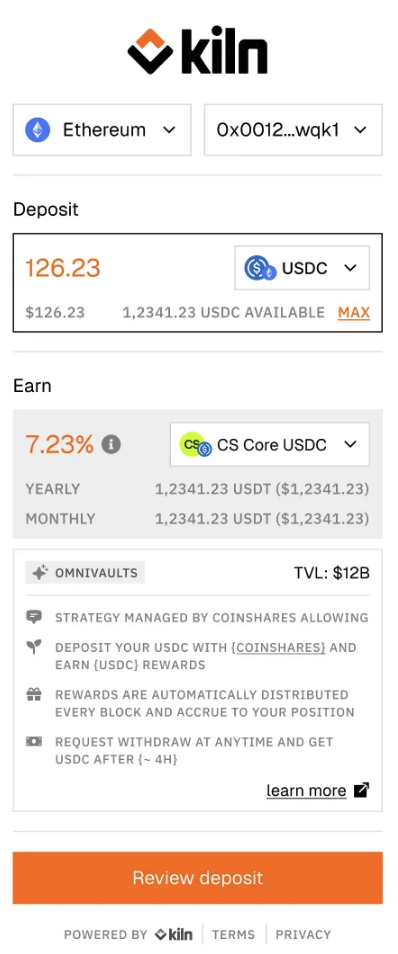 |
3.2 Get user positions
API - GET
/omnivaults/positions?Retrieve user positions in your organization's omnivaults
curl --location 'https://api.testnet.kiln.fi/omnivaults/positions?wallets=0x991c468AbcE2b4DD627a6210C145373EbABdd186&omnivault_ids=8453_0x390d077f8e60ffb58805420edc635670aa4f34c3' \
--header 'Authorization: Bearer kiln_testnet-api-key'Route:
/omnivaults/positions?wallets=&chain_ids=&omnivault_ids=
Query-params:
wallets: required parameter to specify the wallet addresses you want to query onchain_ids: parameter to specify the chains you want to query onomnivault_ids: parameter to specify the omnivaults you want to query ondetailed: true/false to include omnivault object
Returned information
{
  "wallet": "0x1321q3easdx", // Wallet address of the user or depositor
  "balance_in_asset": 12458,  // User’s balance of deposit asset min unit of the token (e.g. USDC)
  "balance_in_usd": 40325.77, // Same balance converted to USD
  "balance_in_shares": 12455, // Receipt token balance in min unit of the token (e.g., kETH, stETH, omnivault shares)
  "total_rewards": 10523,    // Cumulative earned rewards in min unit of deposit asset
  "apy": {                    // Historical performance metrics
    "last_1d": 0.095,         // 9.5% trailing 1-day APY
    "last_7d": 0.071,         // 7.1% trailing 7-day APY
    "last_30d": 0.082         // 8.2% trailing 30-day APY
  },
  "omnivault_id": "1_0xabc123abc123abc123abc123abc123abc123abcd",
  "omnivault_chain_id": "1",              // Chain ID where the omnivault lives (1 = Ethereum mainnet)
  "omnivault_address": "0xabc123abc123abc123abc123abc123abc123abcd", // Contract address of the omnivault
  "omnivault": null || {omnivault object if detailed == true}
  "pending_deposits": [
	  {
		  deposit operation object
		}
  ],
  "pending_redeem":[
	  {
		  redeem operation object
	  }
	]
  "updated_at": "2025-02-12T14:23:00Z" // Last time this wallet/position data was refreshed
}
Integration example
| Integration tips | Integration example | ||
|---|---|---|---|
As a User, I see my positions and rewards, so that I can assess my performance._ 1️⃣ You can completely abstract away the fact that there is a yield bearing token that represent the user position and show the user position in the underlying asset. In this case we decide to display the | 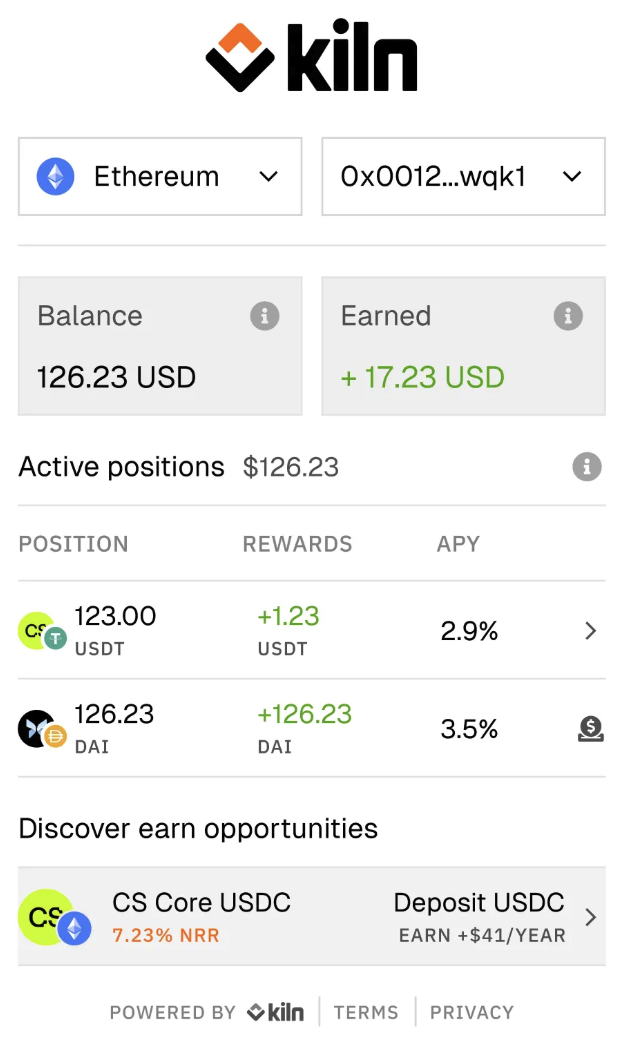 | 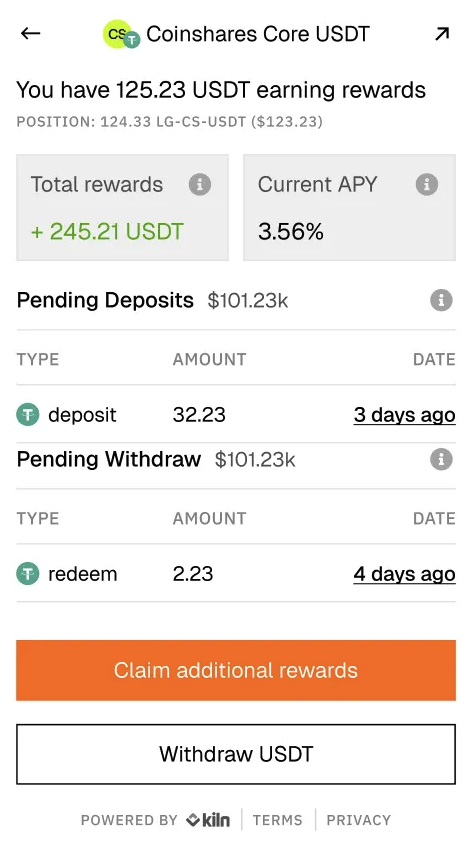 |
4. Omnivaults interactions - Deposit & Redeem
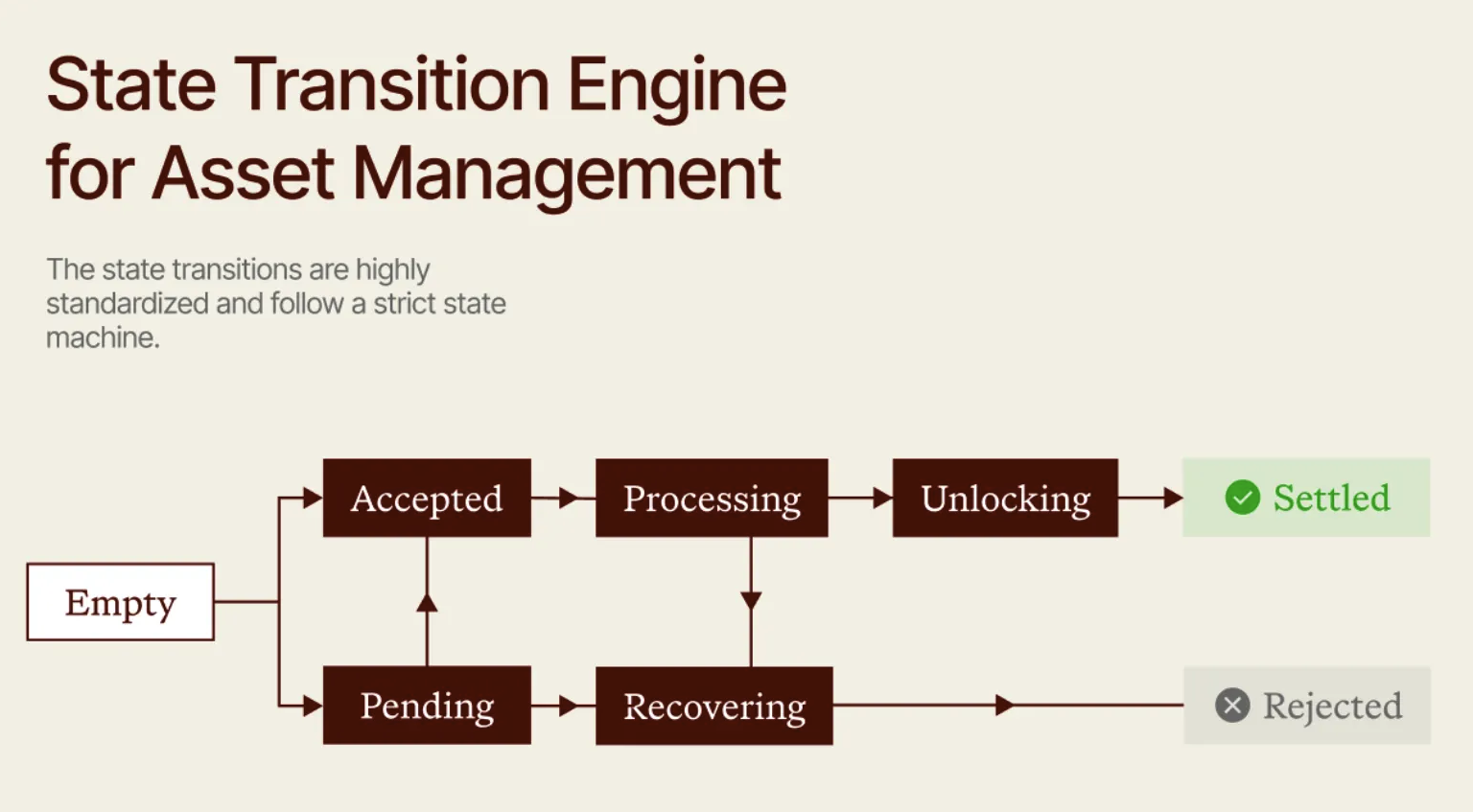
Omnivaults follow Railnet standards, which leverage STEAM—State Transition Engine for Asset Management.
STEAM QueriesAll interactions with omnivaults go through STEAM's standardized query interface. Deposits and redeems to and from omnivaults are made through queries that follow the STEAM standard.
STEAM Lifecycle Management:
create(): Creates a new STEAM query (DEPOSIT or REDEEM), mints a ticket NFT, auto-progresses the query
STEAM query lifecycleConduits implement the full STEAM query lifecycle with automatic progression:
States:
- EMPTY: Query doesn't exist yet.
- PENDING: Query created and recorded by vehicle.
- ACCEPTED: Vehicle accepted the query and is ready for commitment.
- PROCESSING: Assets/shares committed, vehicle is executing the operation.
- UNLOCKING: Operation complete, assets/shares are ready to claim.
- SETTLED: Assets/shares claimed and distributed to recipients.
- RECOVERING: Operation failed, ready to refund original assets/shares.
- REJECTED: Query rejected by vehicle or conduit.
Automatic Progression in
create(): Thecreate()function attempts to progress the query as far as possible in a single transaction:function create(Mode mode, uint256 amount, address receiver) external returns (State newState, uint256 ticketId) { // 1. Construct STEAM query // 2. Mint ticket NFT to receiver // 3. Call vehicle.create() → PENDING // 4. Try to auto-progress: // - If ACCEPTED: call vehicle.commit() → PROCESSING (requires asset/share transfer) // - If UNLOCKING: call vehicle.unlock() → SETTLED (distributes payout) // - If RECOVERING: call vehicle.recover() → REJECTED (refunds) }Manual Progression via
process(): If auto-progression fails or the query needs to wait (e.g., async vehicle operations), users can call process(ticketId) to continue:conduit.process(ticketId); // Progress ticket through next state(s)
Now that we have access to all the reporting data, we can start interacting with the omnivaults. As highlighted above, all these interactions are done through STEAM queries.
This section covers how to perform deposits and redeems via direct contract calls.
↗️ 4.1 Deposit flow
4.1.1. Check allowance & token approval
Before depositing X assets, you must make sure the user approved the omnivault to spend X on its behalf on the asset contract.
- Check allowance before the token approval: call the
allowance(address owner, address spender)(uint256)function on the ERC20 asset contract with the omnivault address as thespender, if there is not enough allowance, you must make the user perform an approve - Approve:
TX - function: approve(address spender, uint256 amount)
- to: asset contract address
- from: user wallet address
- value: 0
- parameters:
- spender: vault address
- amount: amount the user inputed in asset wei (ie amount * decimals)
4.1.2. Deposit
Now that there is enough allowance, we can make the user deposit to the omnivault.
You can craft the transactions on your own and interact with the omnivault directly following the STEAM create() function.
TX - function: create(Mode mode, uint256 amount, address receiver)
- mode:
Mode.DEPOSITto get omnivaults’ shares- amount: amount to deposit (underlying asset)
- receiver: user wallet address (address to receive the ticket NFT)
Returns:
newState: The final state reached after auto-progressionticketId: The ticket ID (NFT token ID) representing this query
Example
Conduit conduit = Conduit(publicConduit);

// Deposit 10,000 USDC
IERC20(usdc).approve(address(conduit), 10_000e6);
(State state, uint256 ticketId) = conduit.create(
    Mode.DEPOSIT,
    10_000e6,
    msg.sender  // receiver of ticket NFT
);

// If state is SETTLED, user already received conduit shares
// If not, call process to continue
if (state != State.SETTLED) {
    conduit.process(ticketId);
}
Integration example
| Integration tips | Integration example |
|---|---|
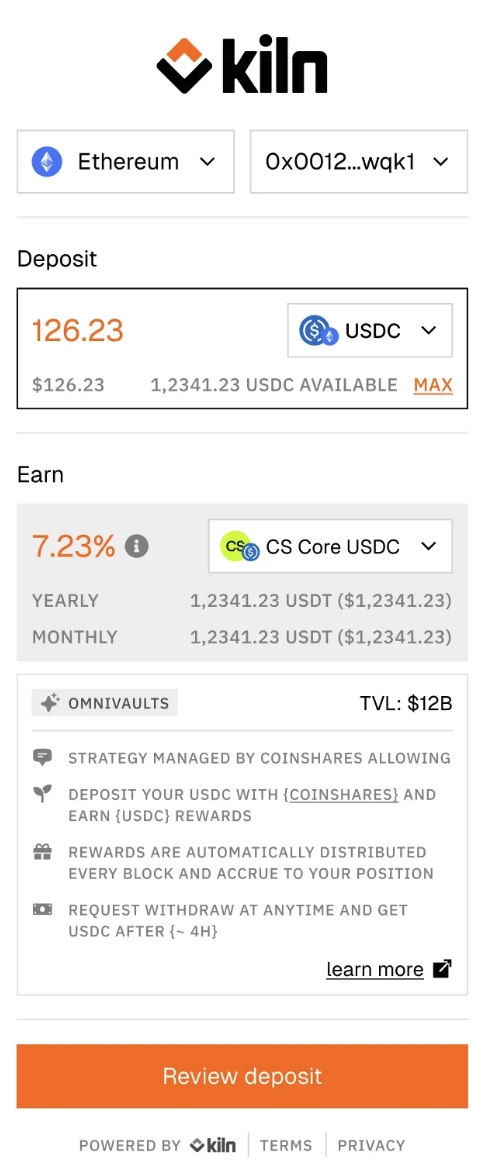
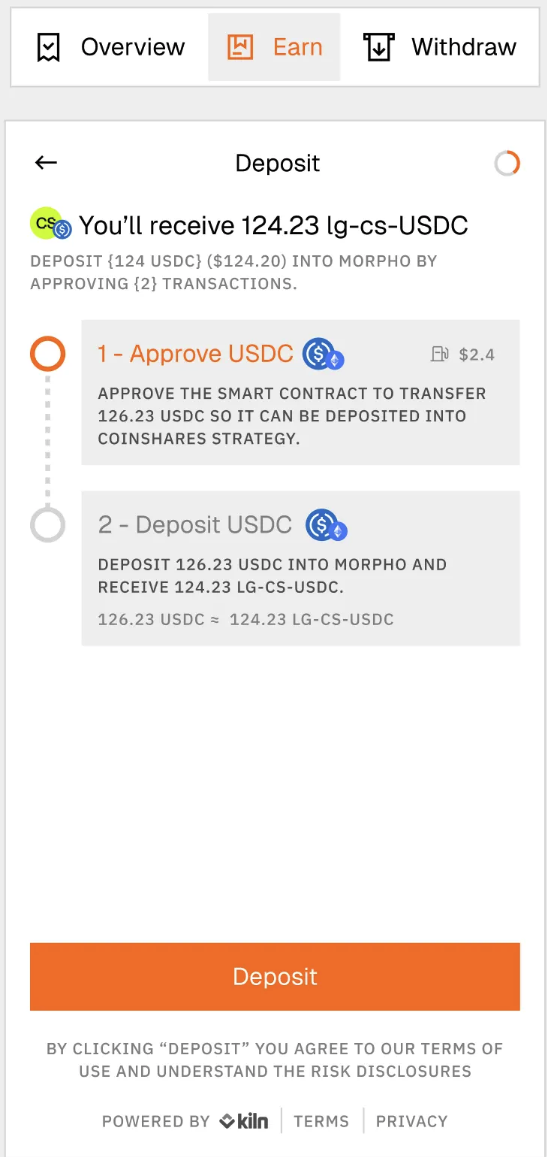
1️⃣ Don't hesitate to display the omnivault metadata in the deposit flow 2️⃣ You can compute the amount of shares the user will receive and get the vaults shares symbol. As they are not pegged 1:1 with the deposited assets, it can be useful to help the user understand what he is doing. 3️⃣ You can also display a preview of the deposit flow. 4️⃣ At the end of the deposit flow, you can redirect the user to the reporting view where he will see generated rewards and position value. |
|
↙️ 4.2 Redeem flow
You can craft the transactions on your own and interact with the omnivault directly following the STEAM create() function.
TX - function: create(Mode mode, uint256 amount, address receiver)
- mode:
Mode.REDEEMto get underlying asset- amount: amount to redeem (omnivault shares)
- receiver: user wallet address (address to receive the ticket NFT)
Returns:
newState: The final state reached after auto-progressionticketId: The ticket ID (NFT token ID) representing this query
Example
Conduit conduit = Conduit(publicConduit);

//...

// Redeem 5,000 shares
conduit.approve(address(conduit), 5_000e18);
(state, ticketId) = conduit.create(
    Mode.REDEEM,
    5_000e18,
    msg.sender
);
5. Monitor your Omnivault distribution from Kiln Dashboard
Monitor the success of your Omnivaults from the Manage section in Kiln Dashboard.
From Manage, you can update the settings of your omnivaults anytime—display name, status, fees, and more.
Updated 10 months ago